
In this post I am going to explain what changes in the xml markup when you restart a line number. In the following two pictures you can see how to restart a number and how it effects the numbers in the word document. In the first example I've used non styled numbering.

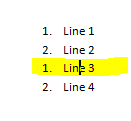
This is what the xml looks like before the restarting. Note the highlighted areas:
 And this is what is looks like after restarting line 3. Note that the numId has changed for line 3 & 4.
 What has also happened is that a new w:num has been created and along with that a new w:abstractNum.


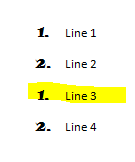


This is what the document.xml looks like after restarting line 3. Note that only the third line has a change applied not the forth as well (which is what you saw in the previous example). Even though the paragraph is still associated to the style, a new number id has been associated as well.


This is what the xml looks like before the restarting. Note the highlighted areas:


If you use custom styled numbering the behaviour is the same however if you associate a custom styled number to a style and then apply that style to a paragraph the structure is somewhat different. In the below images I have applied this and I restarted the third line much the same as I did in the previous example.


This is what the xml looks like before the restarting. Note that there is no numbering associated to the paragraphs, only a style.

This style is then associated to a number in the styles.xml file. You can see the xml for "Demo Style" in the image below.


Regarding the abstract numbering, in this case a new one was not created. Taking a look at the xml generated in numbering.xml you can see that the new numId "7" points to the same abstractNumId "2" as numId "4" (linked to Demo Style). What's also important is that a w:lvlOverride has been added to the new number as well.


